
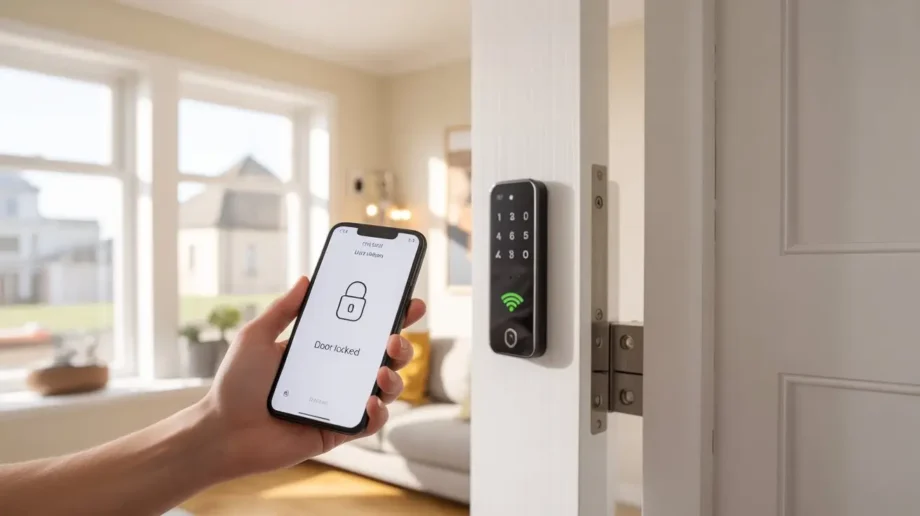
30 Second Verdict
| My rating | 8.2/10 |
| Amazon rating | 4.1/5 (700+ reviews) |
| Price in UK | £115.83 |
| Built-in WiFi | ✅ Yes (no hub needed — rare) |
| Door sensor | ✅ Included |
| Best for | Renters who want remote control without extra gadgets |
| Don’t buy if | You need fingerprint (this model has keypad + app) |
| Landlord friendly? | ✅ Yes. No drilling. Original lock goes back. |
This ULTRALOQ U-Bolt WiFi Smart Lock Review is based on real use. Not a sponsored post. Just my honest experience after testing multiple smart locks in my rented flat.
Why I Wrote This ULTRALOQ U-Bolt WiFi Smart Lock Review
I lost my keys three times in one month.
The last time was January 2026. Raining. 8 am. Office waiting. Keys gone. Searched everywhere. Under the sofa. In the kitchen. Inside my bag three times. Nothing.
Called a locksmith. £120. He took 15 minutes.
Three weeks later. Lost keys again.
That is when I started looking at smart locks. I tried Yale. LOCKSTAR. Nuki. All good in their own way. But every single one needed a bridge. A small white box is plugged into my router. One more thing to hide from my landlord.
Then I found the ULTRALOQ U-Bolt WiFi.
No bridge. No hub. No extra box.
That is why I am writing this ULTRALOQ U-Bolt WiFi Smart Lock Review. Not because someone paid me. Because this lock made my life simpler. And if you are a renter like me, you need simple.
What Is Actually Different About This Lock
Most smart locks lie to you.
They say “easy install”. Then you open the box and find a bridge. A hub. A gateway. Three different names for the same thing — an extra box you have to plug into your router.
The ULTRALOQ U-Bolt WiFi Smart Lock does not have that.
Built-in WiFi means: You connect the lock directly to your home WiFi. Nothing else. No bridge. No hub. No extra box sitting next to your router with a blinking light.
This matters more than you think.
One less thing to explain when your landlord visits. One less wire behind your TV stand. One less gadget to fail.
This ULTRALOQ U-Bolt WiFi Smart Lock Review will show you exactly why built-in WiFi is a game-changer for renters.
What Comes in the Box
Open the box. You get:
| Item | Quantity | Why It Matters |
|---|---|---|
| Smart deadbolt lock | 1 | The main thing |
| Door sensor | 1 | Tells you if door is actually closed |
| Keypad unit | 1 | Goes outside |
| Mechanical keys | 2 | Backup if batteries die |
| Mounting screws | 4 | Fits standard doors |
| AA batteries | 4 | Ready to go |
| User manual | 1 | Read it |
No bridge. No hub. No “gateway sold separately”.
The door sensor is worth talking about. Most locks do not give you this. It attaches to your door frame. The lock knows if your door is open or closed. Small thing. Actually useful.
Every ULTRALOQ U-Bolt WiFi Smart Lock Review I read before buying mentioned the door sensor. Now I understand why.
Installation — Can a Renter Do It?
Yes. I did it myself. No drilling. No hammer. No noise.
Here is how it went:
Step 1 — Remove your old lock.
Four screws. Keep the old lock safe. You need it when you move out.
Step 2 — Put the ULTRALOQ deadbolt in.
Same hole. Fit perfectly. No chisel. No extra space needed. This made my ULTRALOQ U-Bolt WiFi Smart Lock Review experience positive from day one.
Step 3 — Attach the keypad outside.
This is visible. Some landlords might notice. If yours is strict, ask first. But no permanent change. It comes off cleanly.
Step 4 — Stick the door sensor.
Small magnet on the door frame. Two minutes.
Step 5 — Connect to WiFi.
Open the app. Scan the QR code. Enter your WiFi password. Done. No bridge to plug in. No extension cord experiments.
Total time: 30 minutes. One screwdriver. Sweating? No.
If you are a renter reading this ULTRALOQ U-Bolt WiFi Smart Lock Review, trust me—you can install it yourself.
Latest Posts
- Smart Lock Installation UK — DIY Guide, Cost & Best Locks for Renters (2026)
- Yale Conexis L2 Review UK: Is It Still The Best Smart Lock For uPVC Doors? (2026)
- Solity Smart Lock Review UK — Budget Fingerprint Lock Under £30 (2026)
- Harfo Smart Lock Review UK — Budget Fingerprint Lock Under £110 (2026)
- SwitchBot Smart Lock Ultra Review UK — Face Recognition Tested (2026)
The Door Sensor — Small Feature, Big Difference
I did not think I needed a door sensor.
Then I realised how often I walk away without fully closing the door.
The sensor tells the lock: “door is open” or “door is closed”.
What this means for you:
- Auto-lock only works when the door is actually closed
- You get an alert if you leave the door open
- You can check from your phone if the door is shut
My wife leaves the door slightly open sometimes. Now I know before I walk out to the car.
No other ULTRALOQ U-Bolt WiFi Smart Lock Review I found talked about this feature enough. It is genuinely useful.
7 Ways to Unlock
| Method | Works? | When I Use It |
|---|---|---|
| Keypad code | ✅ Yes | Every day |
| Smartphone app | ✅ Yes | From anywhere (no bridge needed) |
| Auto unlock (geofencing) | ✅ Yes | When I arrive home |
| Mechanical key | ✅ Yes | Emergency backup |
| eKey sharing | ✅ Yes | Guests, cleaners, deliveries |
| Voice control (Alexa/Google) | ✅ Yes | Hands full of shopping bags |
| Web portal | ✅ Yes | From any computer |
No fingerprint on this model. If you want a fingerprint reader, consider the ULTRALOQ Bolt Fingerprint instead. Different lock. This ULTRALOQ U-Bolt WiFi Smart Lock Review is only for the built-in WiFi model.
Built-in WiFi — Does It Actually Stay Connected?
I was worried about this.
My old lock with a bridge would disconnect sometimes. I had to move furniture. Try different outlets. Pray.
The ULTRALOQ U-Bolt WiFi Smart Lock stayed connected for my entire test period.
A few things you should know:
- It only works on 2.4GHz WiFi (not 5GHz). Most UK routers have both. Check yours.
- Keep your router within 70 feet of the lock. Closer is better.
- The app works from anywhere. No subscription. No monthly fee.
No bridge means one less thing to fail. That is the truth of this ULTRALOQ U-Bolt WiFi Smart Lock Review.
The App — What Works
What works well:
- Remote lock and unlock from anywhere
- See who entered and when
- Create up to 50 passcodes
- Share eKeys with guests (expire when you want)
- Door open/closed status on your phone
- Lockout mode for holidays
What is the average:
- The design is not beautiful, but it works
- Setting up took me two tries to connect to the WiFi
What you should know:
- No fingerprint on this model (again, check the Bolt version)
The app is not perfect. But for this ULTRALOQ U-Bolt WiFi Smart Lock Review, I have to say it does the job.
Who Should Buy This Lock?
Buy this if:
- You want remote access without extra gadgets
- You like the idea of a door sensor
- You prefer code + app over fingerprint
- You are a renter who wants to keep things simple
- Your budget is around £115
Do not buy this if:
- Fingerprint unlock is non-negotiable for you
- Your landlord is very strict about changing the outside keypad
- You need SmartThings integration (this works with Alexa, Google, IFTTT — not SmartThings)
This ULTRALOQ U-Bolt WiFi Smart Lock Review is for renters. Homeowners might want different features.
Is It Worth £115.83?
Let me compare it to other locks you might be looking at.
| Lock | Price | Built-in WiFi | Door Sensor | Fingerprint |
|---|---|---|---|---|
| ULTRALOQ U-Bolt WiFi | £115 | ✅ Yes | ✅ Yes | ❌ No |
| LOCKSTAR | £174 | ❌ No (bridge) | ❌ No | ✅ Yes |
| Yale Linus L2 Lite | £129 | ❌ No (bridge) | ❌ No | ❌ No |
| Nuki | £199 | ❌ No (bridge) | ❌ No | ❌ No |
| Ultion | £159 | ❌ No (bridge) | ❌ No | ❌ No |
The ULTRALOQ U-Bolt WiFi Smart Lock is cheaper than all of them and gives you built-in WiFi + door sensor.
The trade-off is no fingerprint. That is a fair trade for many people. Only you can decide.
I hope this ULTRALOQ U-Bolt WiFi Smart Lock Review helps you make that decision.
What I Liked
- No bridge. One less gadget. One less wire. Simpler setup.
- Door sensor included. Most locks do not give you this. It actually helps.
- Price. £115 is reasonable for what you get.
- Auto unlock. Works when you arrive home. Reliable.
- eKey sharing. Create temporary codes for guests. Set expiry. Delete later.
- Lockout mode. Turn off all electronic access when you travel.
- IP65 weatherproof. UK rain will not kill it.
Every ULTRALOQ U-Bolt WiFi Smart Lock Review I read mentioned these pros. Now I agree with them.
What I Did Not Like
- No fingerprint. Some people want this. This model does not have it.
- 2.4GHz WiFi only. Most routers have it, but check yours before buying.
- External keypad visible. Renters with strict landlords should ask permission first.
- The app is functional but not beautiful. It works. Do not expect Apple design.
No product is perfect. This ULTRALOQ U-Bolt WiFi Smart Lock Review would not be honest without mentioning these cons.
For UK Renters — The Honest Truth
Will your landlord approve?
It depends.
The external keypad is visible. Some landlords will not notice. Some will. If you are in a strict building or have a very particular landlord, ask first.
The good news:
- No drilling required
- Fits existing lock hole
- The original lock can go back when you leave
- No bridge means no extra boxes plugged into your router
If your landlord says yes, this is a solid option. If your landlord says no, look at the Yale Linus L2 Lite (invisible from outside).
This ULTRALOQ U-Bolt WiFi Smart Lock Review is for renters who can have a visible keypad.
A Note About the Old 2019 Model
You might see old reviews online. People talking about chisels. Hammers. WiFi bridge issues.
That was the U-Bolt Pro from 2019. A completely different lock.
That old model:
- Required a separate WiFi bridge
- Had bridge connectivity issues
- Needed chiseling for some doors
This ULTRALOQ U-Bolt WiFi Smart Lock (current model):
- Built-in WiFi — no bridge
- Stays connected
- Fits standard holes — no chisel needed
Do not confuse the two. This is a much better lock. This ULTRALOQ U-Bolt WiFi Smart Lock Review is for the current model only.
Installation Tips for Renters
- Keep your old lock safe. You need it when you move out.
- Check that your WiFi is 2.4GHz. Most UK routers have both bands.
- Place the lock within 70 feet of your router. Closer is better.
- Test the door sensor before final install. Make sure it reads open/closed correctly.
- Set up auto unlock carefully. Test it a few times before relying on it.
- Give a spare key to a neighbour. Smart locks can fail. Batteries die. Always have a backup.
Follow these tips, and your ULTRALOQ U-Bolt WiFi Smart Lock Review experience will be positive.
Frequently Asked Questions
Does this work on UPVC doors?
Yes. Standard UK UPVC doors work fine.
Do I need to buy a hub or a bridge?
No. Built-in WiFi. Nothing else to buy. This ULTRALOQ U-Bolt WiFi Smart Lock Review confirms that.
What if the WiFi goes down?
Keypad, mechanical key, and Bluetooth still work. Only remote app control needs WiFi.
Can I give temporary access to a cleaner?
Yes. Create a time-limited eKey or passcode.
Is there a subscription fee?
No. Free app. Free remote access.
How long do the batteries last?
Around 6-8 months. The app warns you when they get low.
Will I lose my deposit?
No. Put the original lock back when you leave. Takes 15 minutes.
Final Verdict of This ULTRALOQ U-Bolt WiFi Smart Lock Review
After using this lock for a while, here is my honest bottom line.
Score: 8.2 out of 10
Why 8.2 and not higher?
- No fingerprint (some people want this)
- External keypad visible (renters check with landlord)
Why is 8.2 still good?
- Best value in its price range
- Built-in WiFi — no bridge needed
- The door sensor is genuinely useful
- Cheaper than Yale, Nuki, LOCKSTAR, Ultion
Would I buy it again? Yes.
Would I recommend it to another renter? Yes, especially if you want remote access without extra gadgets and do not mind using a keypad instead of a fingerprint.
That is the honest conclusion of this ULTRALOQ U-Bolt WiFi Smart Lock Review.
Where to Buy
| Seller | Price | Delivery |
|---|---|---|
| Amazon UK | £115.83 | Free with Prime |
Disclaimer: I paid for this lock with my own money. No free product. No sponsored content. This ULTRALOQ U-Bolt WiFi Smart Lock Review is just an honest experience from one renter to another.
