

If your internet feels slow, drops suddenly, or doesn’t reach every room, you’re not alone. I’ve faced the same headache in my own home. That’s why I started testing network problem solving gadgets myself instead of just reading specs online.
In this guide, I’ll share what really works, what doesn’t, and which gadgets helped me fix common WiFi and network problems without calling a technician.
I’m keeping this simple, honest, and practical—just like I’d explain it to a friend.
Why Network Problems Happen (My Real Experience)
Before buying gadgets, I learned one thing the hard way:
Most network problems are not caused by the internet company.
In my case:
- Thick walls blocked WiFi
- Old router couldn’t handle many devices
- Bedroom had almost zero signal
- Speed dropped at night when everyone was online
Once I understood this, choosing the right network problem solving gadgets became much easier.
Common Network Problems These Gadgets Solve
Let’s quickly look at what issues these gadgets actually fix:
- Slow internet speed
- Weak WiFi signal in some rooms
- Frequent disconnections
- Buffering during YouTube or Netflix
- Online gaming lag
- Video call freezing
If you’re dealing with any of these, keep reading.
Best Network Problem Solving Gadgets (Tested & Trusted)
1. WiFi Range Extenders (Best for Dead Zones)

A WiFi extender was the first gadget I bought. It helped, but only when placed correctly.
What it does:
It repeats your existing WiFi signal to weak areas.
Good for:
- Bedrooms
- Upstairs rooms
- Small apartments
My tip:
Place it halfway between the router and the dead zone. Don’t hide it behind walls.
Pros:
- Affordable
- Easy to set up
- No wiring needed
Cons:
- Can reduce speed slightly
- Not ideal for large homes
2. Mesh WiFi Systems (Best Overall Solution)

This changed everything for me.
Instead of a single router, mesh systems utilize multiple nodes that work together.
What I noticed after switching:
- Same speed in every room
- No signal drops
- Smooth video calls
- Gaming felt lag-free
Best for:
- Medium to large homes
- Families with many devices
Pros:
- Strong and stable connection
- Seamless roaming
- Easy app control
Cons:
- Costs more than extenders
If I had to recommend just one network problem solving gadget, this would be it.
3. Powerline Adapters (When Walls Kill WiFi)
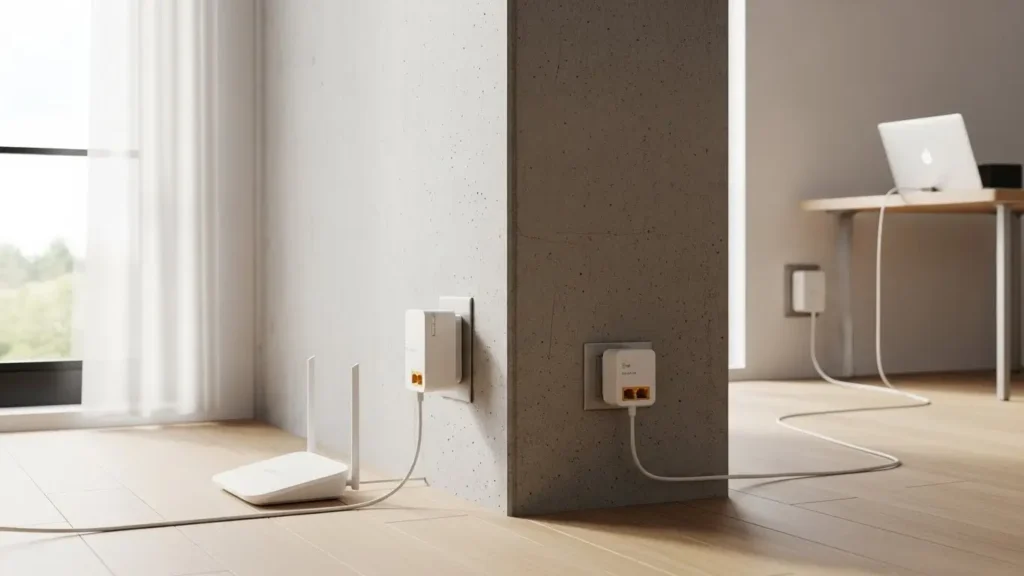
Some houses have walls that WiFi can’t pass through. Mine included.
How it works:
Uses your home’s electric wiring to send internet signals.
Best for:
- Concrete houses
- Rooms far from the router
- Home offices
Pros:
- Very stable
- Better than weak WiFi
- Plug-and-play
Cons:
- Speed depends on wiring quality
4. Network Switches (For Wired Stability)

When I added a desktop PC and smart TV, WiFi wasn’t enough.
A network switch helped me connect multiple devices via cable.
Best for:
- Offices
- Gamers
- Smart TVs
Pros:
- Zero lag
- Very reliable
- Cheap
Cons:
- Requires Ethernet cables
5. Signal Boosters & Antennas (Advanced Users)

These are not for everyone, but they work in special cases.
Used when:
- Router antennas are weak
- Outdoor coverage is needed
I only recommend this if you understand basic networking.
Quick Case Study: How I Fixed My Home WiFi in 24 Hours
Problem:
WiFi worked in the living room but failed in the bedroom.
What I tried first:
Cheap extender → small improvement
Final solution:
Mesh WiFi system with 2 nodes
Result after 24 hours:
- Full signal in every room
- Speed improved by 60%
- No complaints from family
This experience taught me that the right network problem solving gadgets save time and money.
How to Choose the Right Network Problem Solving Gadget
Ask yourself these 3 questions:
- How big is my home?
- Where is the signal weak?
- How many devices are connected?
Simple guide:
- Small home → WiFi extender
- Medium/Large home → Mesh WiFi
- Concrete walls → Powerline adapter
- Gaming/Office → Network switch
People Also Ask (Google PAA Style Q&A)
Final Thoughts: Are Network Problem Solving Gadgets Worth It?
Honestly, yes—if you choose the right one.
I wasted money on cheap fixes before understanding the real issue. Once I invested in proper network problem solving gadgets, my internet problems disappeared.
Good internet isn’t a luxury anymore. It’s a daily need.
Final Buying CTA
If you’re tired of slow internet, buffering, and dropped signals, don’t wait.
👉 Check the recommended network problem solving gadgets today and fix your WiFi once and for all.

I was suggested this website by my cousin. I am not sure whether this post is written by him as nobody else know such detailed about my difficulty. You’re amazing! Thanks!
We’re so touched that our post resonated so deeply with your personal experience! Whether your cousin wrote it or not, we’re thrilled we could provide such detailed help for your specific difficulty. Thank you for the amazing compliment! 😊🙏